Posts

About Start Software

Start Software is an award-winning developer and leading publisher of asbestos software, systems for the legal services industry and more.

Want to know more about asbestos software Alpha Tracker? Alpha Tracker is the most used asbestos software in the UK, Australia & New Zealand with more than 60m items of asbestos data stored.

Our legal services software Alpha Legal helps will writers, accountants, solicitors, IFAs and estate agents to communicate securely with clients. Read about developments here on the blog.

Or need help with Alpha Anywhere or Alpha Transform projects or software development? You'll find useful info here.

The release notes are now available for Alpha Tracker Release 36

Kim has finished the release notes for Alpha Tracker Release 36 and you can find them here:

The release notes are always worth a read!

We do recommend that you spend 5-10 minutes reading the release notes if you can, as we highlight important changes and new features in asbestos software Alpha Tracker.

Even if you don't have time to read them, do print them out and keep them with your system documentation in case your accreditation body wants to see them at a visit.

New integration with TrustID coming very soon

We have partnered with ID verification specialist TrustID so that Alpha Legal users will be able to securely request ID documents and verify them all within Alpha Legal.  

This is an exciting addition to our feature-set and will make Alpha Legal an even better, simpler and more cost-effective tool for estate agents, accountants and solicitors nationwide.

TrustID and Alpha Legal are working together

We'll blog again once the feature is available to all users.

Are you making full use of project milestones? You might be able to ditch a spreadsheet (or two!)

Project milestones are an easy way to track the jobs in your business.  If you set them up properly in Alpha Tracker, you won't need any additional spreadsheets to track jobs as they progress because Alpha Tracker will do it all for you.

"Milestones" are key events in the life of a project.  You don't want too many, but just enough to enable you to track the most important stages in a project.  We suggest that 10 on a job might be too many - aim for a handful, at most.

Step 1 is to set up the milestone template for each type of work you do.  Do this in the menu option Setup|General|Project Types.  Click the "+" button to show the milestone template:
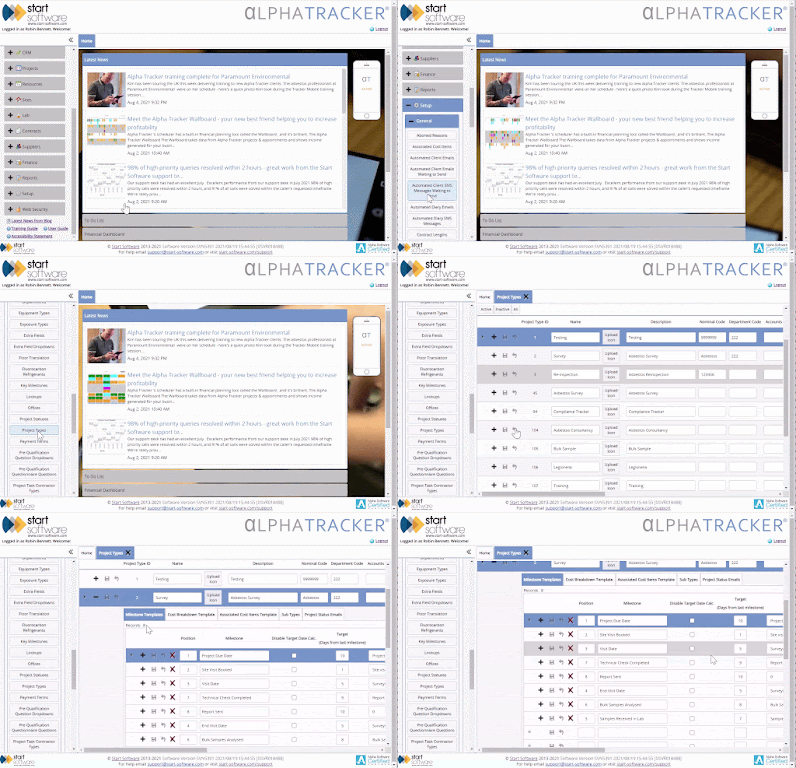
First, set the milestone template

Step 2 is to update the milestones as you complete them.  Open the project, click the "Milestones" button and simply update who did what and when.  Double-clicking is a quick way to set "today" and "me" as the date/time completed and the person who completed the milestone:
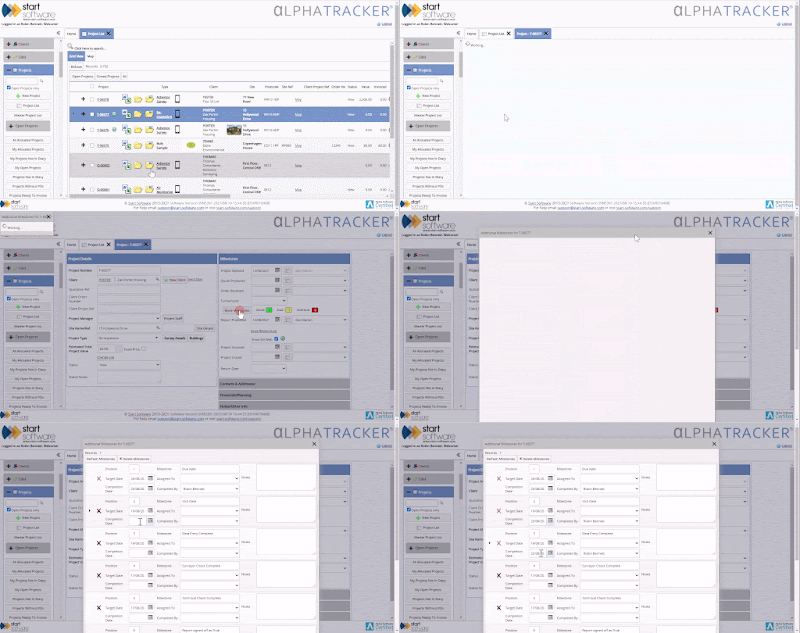
Update the milestones as the job progresses

OR - here's a great tip - use the "+" button on Project List to get to the same milestone screen:
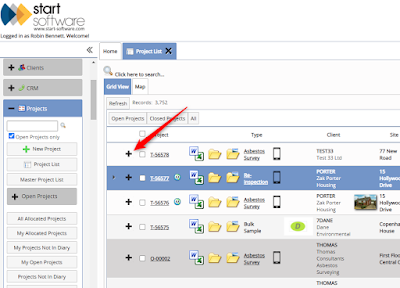
Timesaver - use the "+" button to show the project milestones

Step 3 - ditch the spreadsheets!  Alpha Tracker has many screens which show you the milestones and how you are doing on each job.  You can even configure Tracker Dashboard to automatically send you daily, weekly or monthly emails with summaries of your company's KPI performance.

We also have a new "Project Pipeline" screen coming in the next Alpha Tracker release.  Here's a sneak preview...
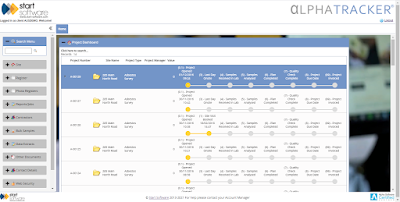
Look out for the new Project Pipeline screen, coming soon


New asbestos sample/item "auto-numbering" options coming soon

Do you use the AutoNumber button on our "Survey Items" screen?

Do you have clients who want you to number each item you record using a numbering scheme of their choosing?

If the answer to either of these questions is "yes", read on!

New option coming soon to the AutoNumber button?

We've decided to extend what our AutoNumber button does.  Currently, clicking this button will assign a number to each item in an asbestos survey, but always starting always at "1".  Naturally, Alpha Tracker has a unique identifying number for every item and this is always assigned when your surveyor sends their data back to the server - but the AutoNumber button is a popular feature where consultancies want reports to have items numbered 1, 2, 3.. etc.

The new functionality behind the button will allow you to start the numbering from any number, not just 1.  In particular, if you have clients who give you a batch of numbers and want you to take numbers from a range, the new features in AutoNumber will allow you to do this, completely automatically.

Do get in touch with Elaine if you want more info - we'd be delighted to hear from you!

Alpha Legal and Countrywide working closely together

We're proud to be associated with Countrywide Tax & Trust Corporation (CTTC) because Alpha Legal enables their will writing and estate planning consultants - 1,000s of them - to communicate securely with their clients.

Countrywide Tax &Trust and Alpha Legal working together to improve the client experience 

Will from Alpha Legal support visited CTTC this week to train software specialist Humza.  Nice photo, both!

Tracker Filer has been updated to help you with Account Management (in particular)

The beta test version of Tracker Filer has been signed off and the latest version has been released.  

This Tracker Filer update has an amazingly useful new feature - do watch this short video to find out more.


You can now cc Tracker Filer at your organisation even if you don't specifically mention a quote or project number.  Tracker Filer will look at the email address(es) you have sent or cc'd the email to, and then save the emails as records in the Alpha Tracker CRM module.

That might not sound like a game-changer but we've been using the feature in beta test for a few weeks and it has saved us hours of admin!  Do call and speak to Robin or Elaine if you want to find out more.

Alpha Tracker Release 36 is now available

Jack has released Alpha Tracker Release 36 and it is now available for you to update your system.

Here's a 5-minute intro to this update - it's well worth watching if you can find the time.

I've highlighted some of the new features for you in the video:

  • more sophisticated quote and project cost breakdowns

  • a better (simpler) screen for entering asbestos lab results

  • equipment QR codes for tracking and asset management

  • faster document creation

  • the new Account Management features.
Kim is finishing the release notes now - we'll blog again as soon as they are ready to download.  It's always worth doing that and keeping the release notes to show the accreditation body at the next visit.


Blog Archive

Show more